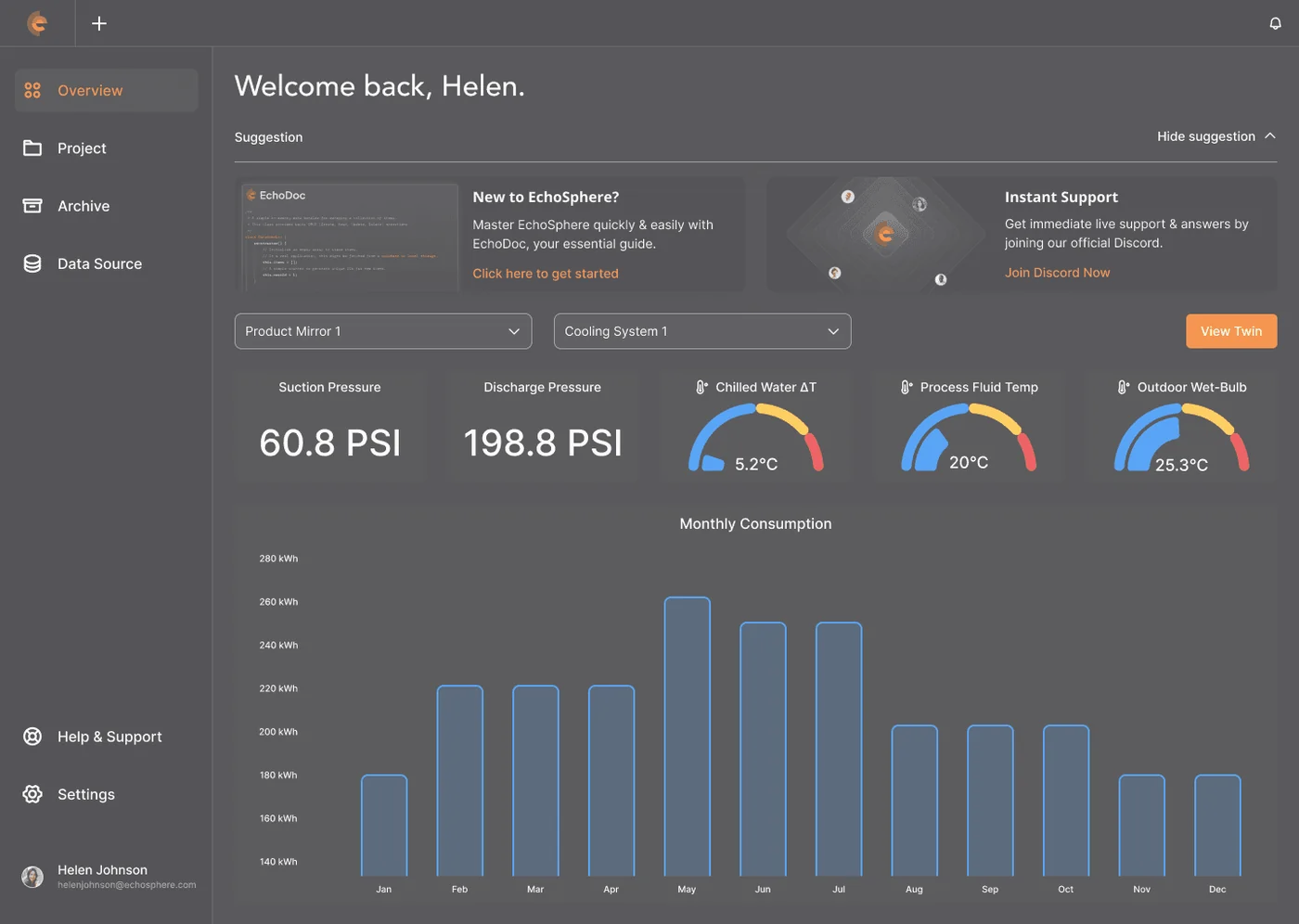
A Digital Twin platform taken from concept to six enterprise contracts in three years, operable by the crane engineers and safety officers who use it rather than the developers who built it.
At a glance
- What it is
- A Digital Twin platform crane engineers and logistics managers set up themselves, with no code and no vendor engineer on site.
- What I owned
- Lead Product Designer, standing in as Product Manager because the product needed one and the team had none. Roadmap and scope through to every screen. I joined before the product existed.
- The call I made
- I cut my own scope. Free-camera 3D became fixed viewpoints with 2D tagging, because the engineers’ years-old Toughbooks would have throttled.
- The constraint
- The first contract had to close in four months, before the sales pipeline went cold.
The problem
The brief was a Digital Twin platform that non-developers could set up themselves: crane engineers, logistics managers and safety officers connecting live IoT sensor data to a 3D model, and getting automated alerts the moment something goes wrong.
The brief was a Digital Twin platform that non-developers could set up themselves: crane engineers, logistics managers and safety officers connecting live IoT sensor data to a 3D model, and getting automated alerts the moment something goes wrong.
Role
Lead Product Designer, interim Product Manager
Team
1 designer and PM, 2 frontend, 2 backend
Timeline
Mar 2020 to Nov 2023
Platform
Web Platform, desktop
Business impact
Concept to a commercial platform with recurring contracts
A platform for people who don’t write code
Hiverlab was pitching Digital Twin contracts with a concept and no product to show. The stakes were real: Keppel’s drydocks recorded a fatal accident in 2020, then two more dockside deaths and a crane collapse by 2022. Every inspection hour walking an active yard kept an engineer inside that risk.
The clients needed remote monitoring, and the hard part sat in one sentence: they weren’t developers and didn’t want to be, yet they had to set it up themselves. First contract, four months out.
My role and contribution
I joined as Lead Product Designer in March 2020, before the product existed, and stood in as Product Manager because there was no one in the seat: roadmap, scope and client conversations alongside every screen. Two frontend and two backend engineers, so clear specification was a survival skill.
I designed the prototype that closed the first contract in four months, established the Design System the product still ships on, ran the Contextual Inquiry at Keppel FELS Tuas and DB Schenker, and facilitated the User Story Mapping workshop that defined the MVP.
Visuals here are faithful recreations, rebuilt to respect NDA boundaries.
The process
Key objectives
Close the first contract in four months
A working, sellable MVP before the pipeline went cold. The deadline shaped every scope decision that followed.
Design for non-developers
Engineers and safety officers had to connect sensors, import models and configure alerts themselves, without writing a line of code.
Treat edge cases as the main cases
In industrial software the failure states are safety scenarios, so the scope treated them as core screens, not rare exceptions.
Carry design and product together
Leading design while standing in as product manager, keep the roadmap, the scope and the screens telling one story that four engineers could build without ambiguity.
Studying the category
Research happened on site. I ran Contextual Inquiry, shadowing engineers through their shifts rather than pulling them into a meeting room. At Keppel FELS Tuas, crane operators monitored 400-foot cranes on paper logs, checking by hand every two hours. At DB Schenker, an underperforming cooling unit surfaced only once it died.
MVP user stories
Systems thinking
The platform was structured around one spine: connect a data source, import a 3D model, attach data charts, configure trigger alerts. Four sequential steps built as a wizard, with every state mapped, including the ones that only matter when something goes wrong.
A wizard with no wrong turns
The four-step setup runs in strict sequence so users can’t skip ahead and get lost. Each step confirms itself before the next unlocks, which is what made the platform operable by people who never read manuals.
Edge cases as first-class states
A data source dropping mid-setup, a model file in an unsupported format, an alert firing while the user is offline. In industrial software these are safety scenarios, so each got its own designed state, never a generic error.
Three stories scoped the MVP
Visualise and monitor sensor data on the model, get notified of faults to minimise downtime, get notified of warnings to protect personnel safety. Everything else waited, which is how the four-month deadline held.
Process archive - the full flows & structure, 2 artefacts for the deep read
Define & structure
Step 1 of 4. Connect a live data source and the readings preview instantly.
Process
Shadowed crane operators across full shifts. They ran manual environmental checks every 2 hours on paper logs, with no automated alert for a temperature or vibration anomaly, so a spike between checks went undetected until it caused damage.
Mapped the critical path: connect data source, import 3D model, attach charts, configure alerts. A sequential wizard means a non-technical user cannot skip ahead or get lost, and each step recovers its own errors.
A 5-step wizard supporting MQTT, HTTP, Modbus, OPC-UA and serial. The live preview shows readings the moment a connection opens, so a dead feed is caught before the model.
Built the Design System from scratch. Handover documentation covered component specs, interaction states and edge cases, so engineering could build without constant design input.
[ Scope trade-off ]
The feature I argued myself out of
The designer wanted free-camera movement: orbit the asset, inspect it from any angle. The product manager knew the engineers carried years-old Toughbooks that would throttle on an expensive scene. Both of those people were me, and the first contract was four months out.
The product manager won: the camera locked to fixed optimal viewpoints, and the spatial work moved to 2D tagging layered over them.
The trade
It gave up the demo-reel moment and held 60fps on the hardware the client actually owned. That is the version that shipped, and the version Keppel signed.
The solution
Three product decisions carried the platform, each shaped by what industrial users could realistically operate on their own.
A connector that proves itself
The connector is a five-step wizard supporting five sensor types, with a live preview showing incoming readings the moment a connection is made. Users confirm the data is real before attaching anything to the model, which removed the platform’s biggest moment of doubt.
- Five sensor types covered the full range of client hardware from day one.
- The live preview turns an abstract connection into visible, moving proof.
- Each step validates itself, so a failed connection never travels downstream.
The connector wizard: five sensor types, with live readings previewed before anything attaches to the model.
Direct manipulation on the Digital Twin
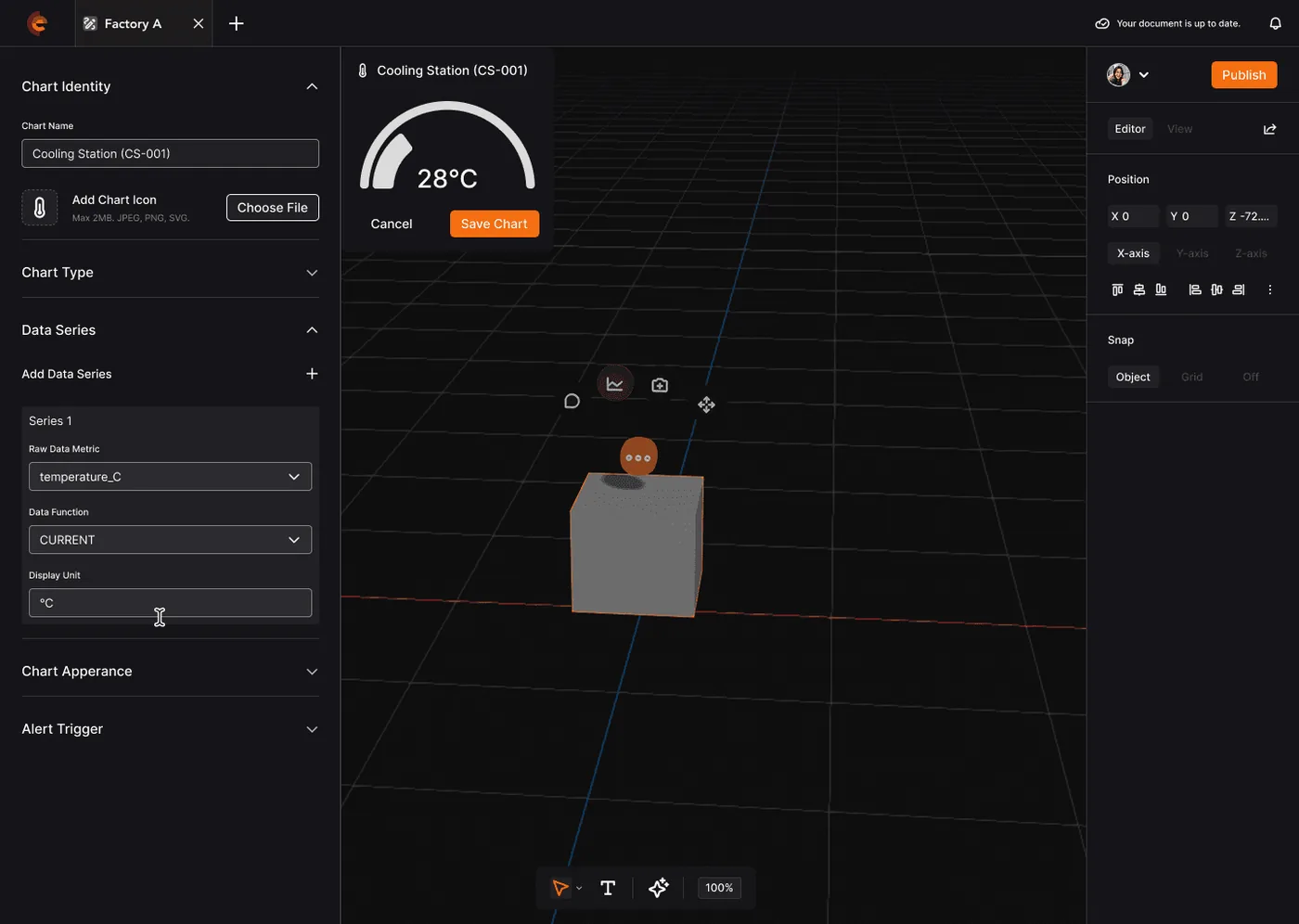
Clicking any asset in the 3D viewport opens a context panel: add a data chart, an annotation, a scene camera shortcut, adjust position. Everything is spatial and direct, with no abstract settings page between an engineer and the crane they are looking at.
- Charts attach where the data lives, on the asset itself.
- Annotations and camera shortcuts keep site knowledge inside the Digital Twin.
- The interaction model matches how operators think: click the asset they can see and act on it in place.
Spatial chart attachment: click any asset on the model to act on it directly.
Alerts without code
The alert builder is no-code. Users define if-then rules, such as a temperature threshold sending a notification, without SQL or scripting. Three severity levels (Information, Warning, Danger) carry different notification behaviour, so urgency matches consequence.
- If-then conditions read like the sentences engineers already use.
- Three severity levels separate awareness from action from emergency.
- Notification behaviour scales with severity, protecting attention as well as safety.
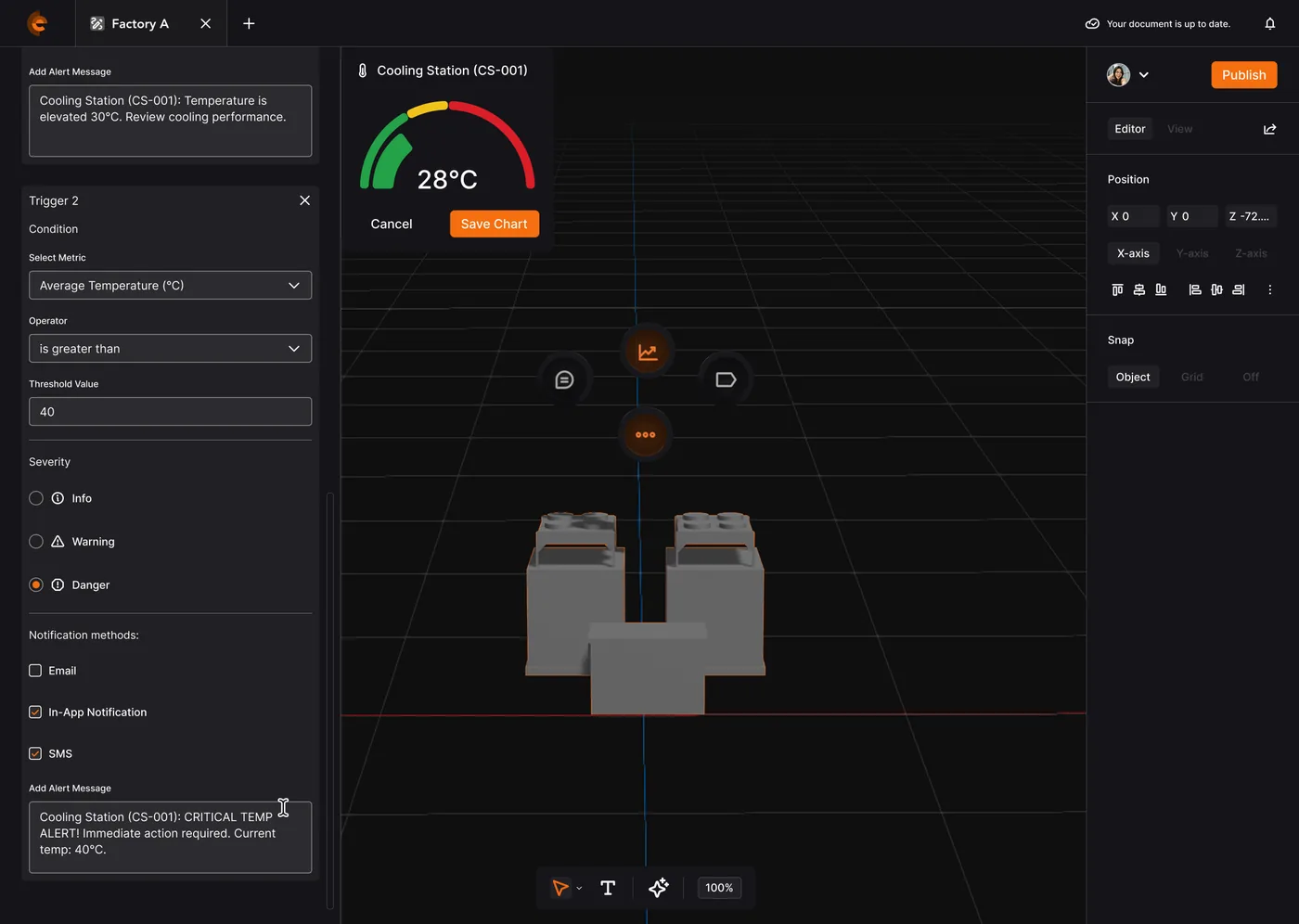
The no-code alert builder: if-then rules with Information, Warning and Danger severities.
Results overview
Screen archive - every screen in the build, 24 for the deep read
Outcome
What it became
The platform shipped to Keppel, DB Schenker, Hamburg Port, Omron AGV, HP Indigo and JamK Cyber Sec: six clients in three years, each on a different use case.
Keppel cut on-site inspection time by 50%, halving the hours engineers spent in an active yard. DB Schenker improved goods handling efficiency by 30%. Omron raised AGV (automated guided vehicle) engineering efficiency by 40% by simulating deployments before committing them to the floor. HP Indigo was shortlisted at the SICC Awards 2022.
Clients bought it because their own engineers could run it without a vendor on site, and the pipeline lifted 25%.
What the work taught me
Three years, six clients and a designer standing in as product manager left lessons that outlasted the product itself.
Bought by one person, used by another
Enterprise products are bought by people who will never use them and used by people who never chose them. Designing for that split (executive-legible demos on top of operator-proof workflows) was the real 0 to 1 work, and it’s the lens I’ve brought to every B2B product since.
The system outlasts the screens
The Design System, naming conventions and handover documentation from year one are what let four engineers build across six very different deployments without a designer in every room. Carrying the product manager hat taught me the system matters more than any single screen.
Go where the work happens
I was wrong to trust the requirement documents on their own. Nothing in them mentioned the paper logs, the two-hour manual rounds, or the faults surfacing in the gaps between checks. The decisions that won contracts came from standing on site at Keppel and DB Schenker.