The back-office console that compliance officers had routed around with personal spreadsheets, rebuilt until the average search fell from 4 minutes 28 seconds to 1 minute 25.
At a glance
- What it is
- The back-office console compliance officers had routed around with personal spreadsheets, rebuilt until the spreadsheets disappeared.
- What I owned
- Senior UX Designer. I led the redesign and mentored the two UX designers who finished it.
- The call I made
- The Information Architecture came from Card Sorting with compliance officers, tree-tested before a single screen was drawn.
- The constraint
- Fuzzy search had to be bounded. The database could not absorb an edit-distance query on every keystroke.
The problem
Compliance officers at a Southeast Asian KYC platform spent their day inside a back-office console that had grown for two years with no design review. It set the pace of every review, and it was the bottleneck.
Compliance officers at a Southeast Asian KYC platform spent their day inside a back-office console that had grown for two years with no design review. It set the pace of every review, and it was the bottleneck.
Role
Senior UX Designer
Team
1 senior designer, 2 UX designers, 2 frontend, 1 backend
Timeline
6 months, 2024
Platform
Web Application, desktop
Business impact
A failing usability grade to an A
Where the first benchmark landed
Task completion
42%
Four in ten review tasks finished without help. Officers worked around the console rather than through it, keeping their own spreadsheets to track what it could not.
Average search
4:28
Search matched exact prefixes only, so a misremembered name returned nothing. Four and a half minutes to reach one submission, across a queue measured in thousands a day.
SUS score
28
A failing grade against the 68 that counts as average. Three filters sat in separate dropdowns, and column labels carried system codes only engineering understood.
My role and contribution
Senior UX designer leading the console redesign and the team behind it: two UX designers under my direction and mentoring, two frontend engineers and one backend engineer, over six months.
Owned end to end
- 01Interviews with 7 compliance officers
- 02Card Sorting and Tree Testing that rebuilt the Information Architecture
- 03Interaction Design for search, filtering and export
- 04Copy review with the compliance team
- 05Usability Audits before and after, run on the same protocol
Non-negotiables
- 01Fuzzy search had to run on the index the database already had.
- 02Every label change reviewed with compliance for accuracy, not just plainness.
- 03Two new designers joined under my direction and had to ship.
The process
How the research ran
I interviewed 7 compliance officers over two weeks, ran Card Sorting with 5 of them, and tree tested the proposed structure with 8 officers, one more than the interview pool, before touching any screens. All seven interviewees said the same thing: they couldn’t trust the search.
Systems thinking
The console was restructured from the Information Architecture up, before a single interface was drawn.
An IA rebuilt from Card Sorting
Five officers sorted the console’s content by client status and date. The internal product categories meant nothing to them, so the structure follows the mental model of the people doing the work.
Tree tested before any screens
The proposed architecture was validated with Tree Testing before high-fidelity work began, so structural mistakes were caught while they cost hours instead of sprints.
One path through the task
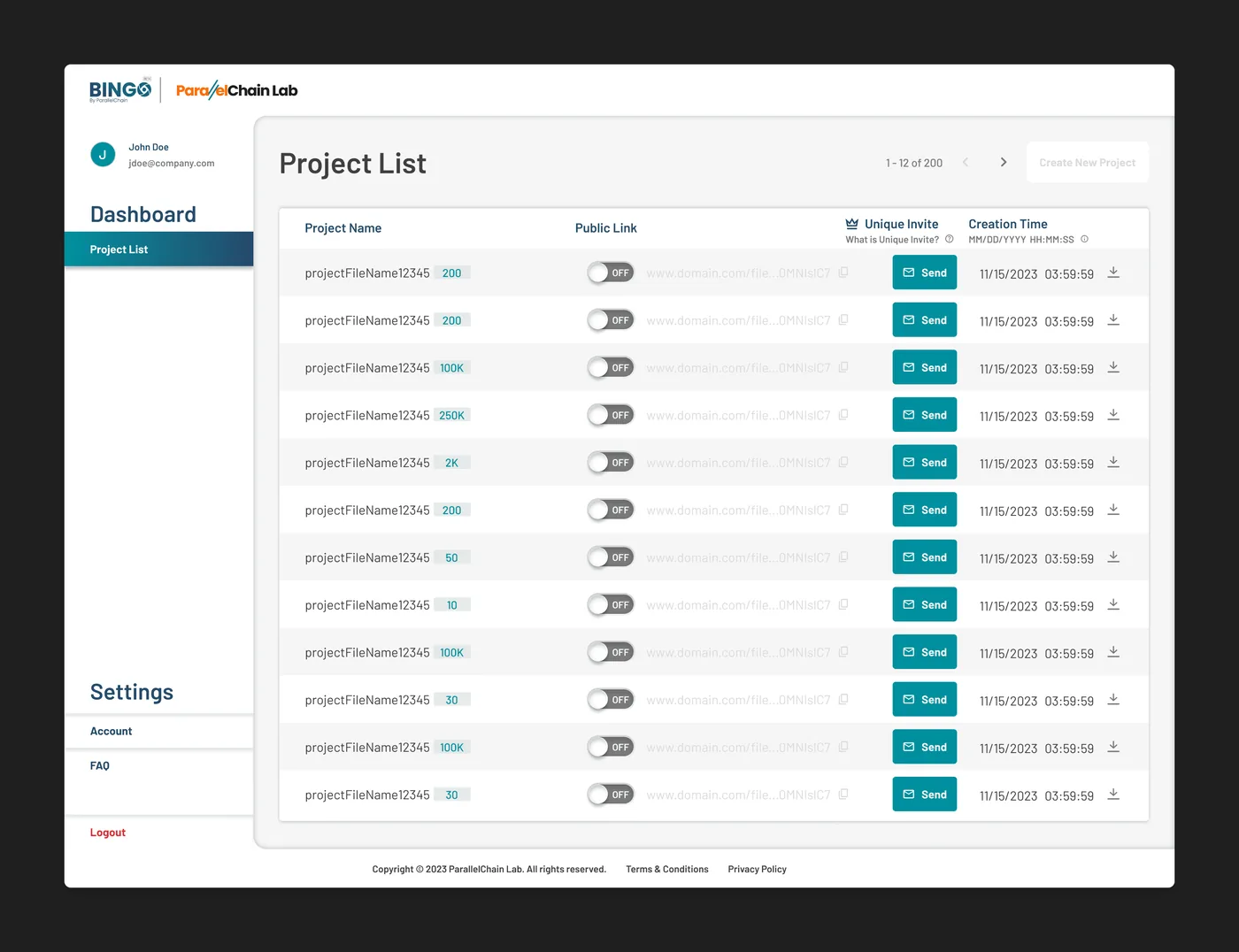
Search, filter, review, export, mapped as a single flow. Every screen answers one question: what does the officer need next to finish this review?
Process archive - the full flows & structure, 2 artefacts for the deep read
Define & structure
Open Card Sort with 5 compliance officers, 40 content cards each, sorted independently. They grouped by client status and recency. Nobody grouped by BINGO’s product taxonomy.
Fuzzy search with edit-distance matching. Autocomplete surfaces at 2 characters. Handles partial names, IC number fragments and common misspellings.
Information architecture
The solution
Four changes drove the result, each answering a specific failure the research had isolated.
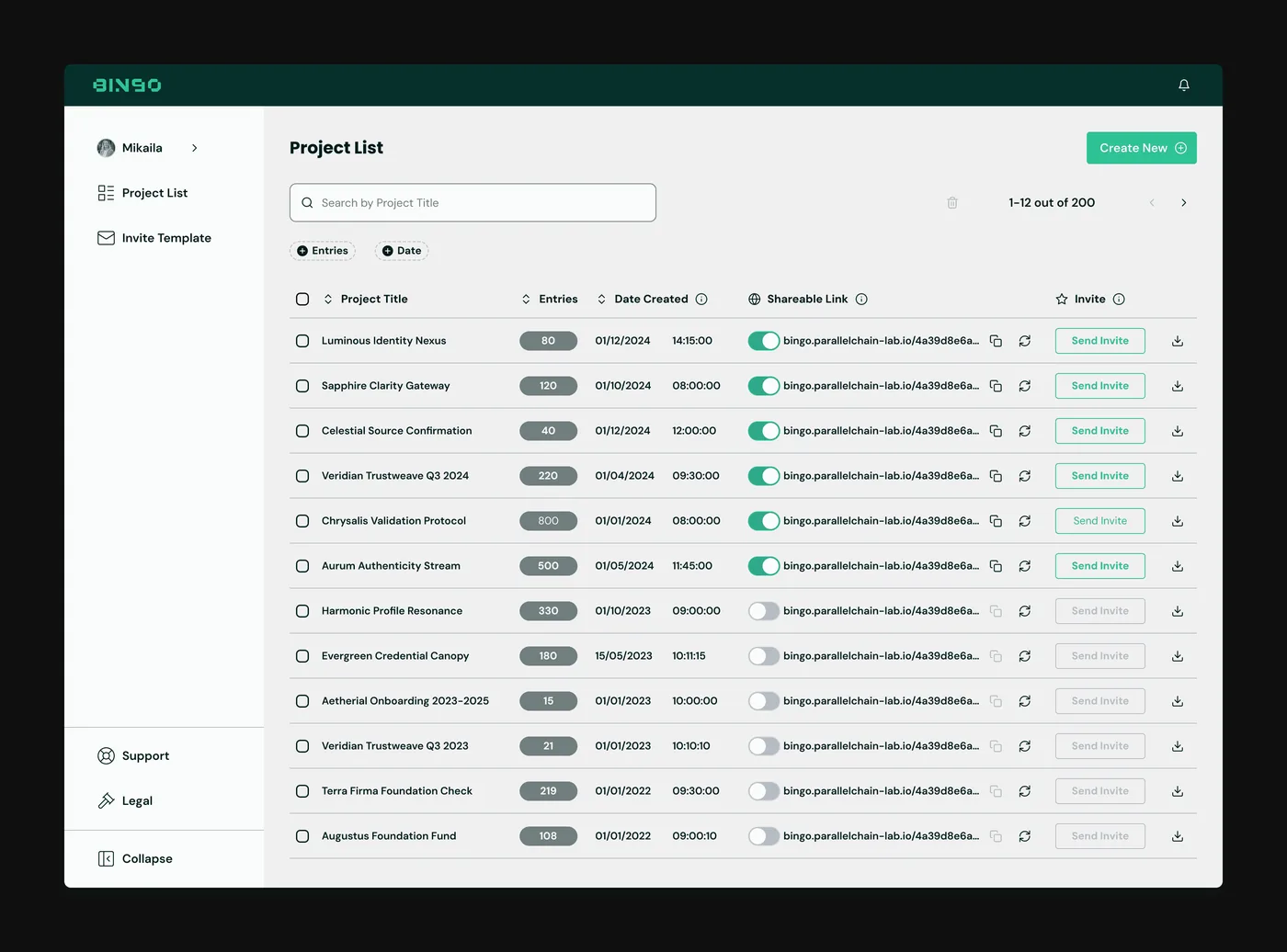
Search that forgives
Exact-prefix matching was why a search took 4 minutes 28 seconds. One wrong character in a surname returned nothing, with no hint a near match existed, so officers gave up and scrolled the queue instead.
Edit-distance matching fixes that for the officer and hands the cost to the database, which could not absorb a fuzzy query on every keystroke. So the backend engineer and I bounded it together.
- Partial names and mistyped IC numbers still return the right record.
- Filter chips replaced stacked dropdowns, so active filters read at a glance.
Where we landed
Autocomplete starts from the second character rather than the first, and input is debounced by 300ms. The officer still lands on a submission in under 90 seconds. The database sees a fraction of the queries a naive build would have thrown at it.
Fuzzy search and stackable filter chips, so officers find what they need in one action.
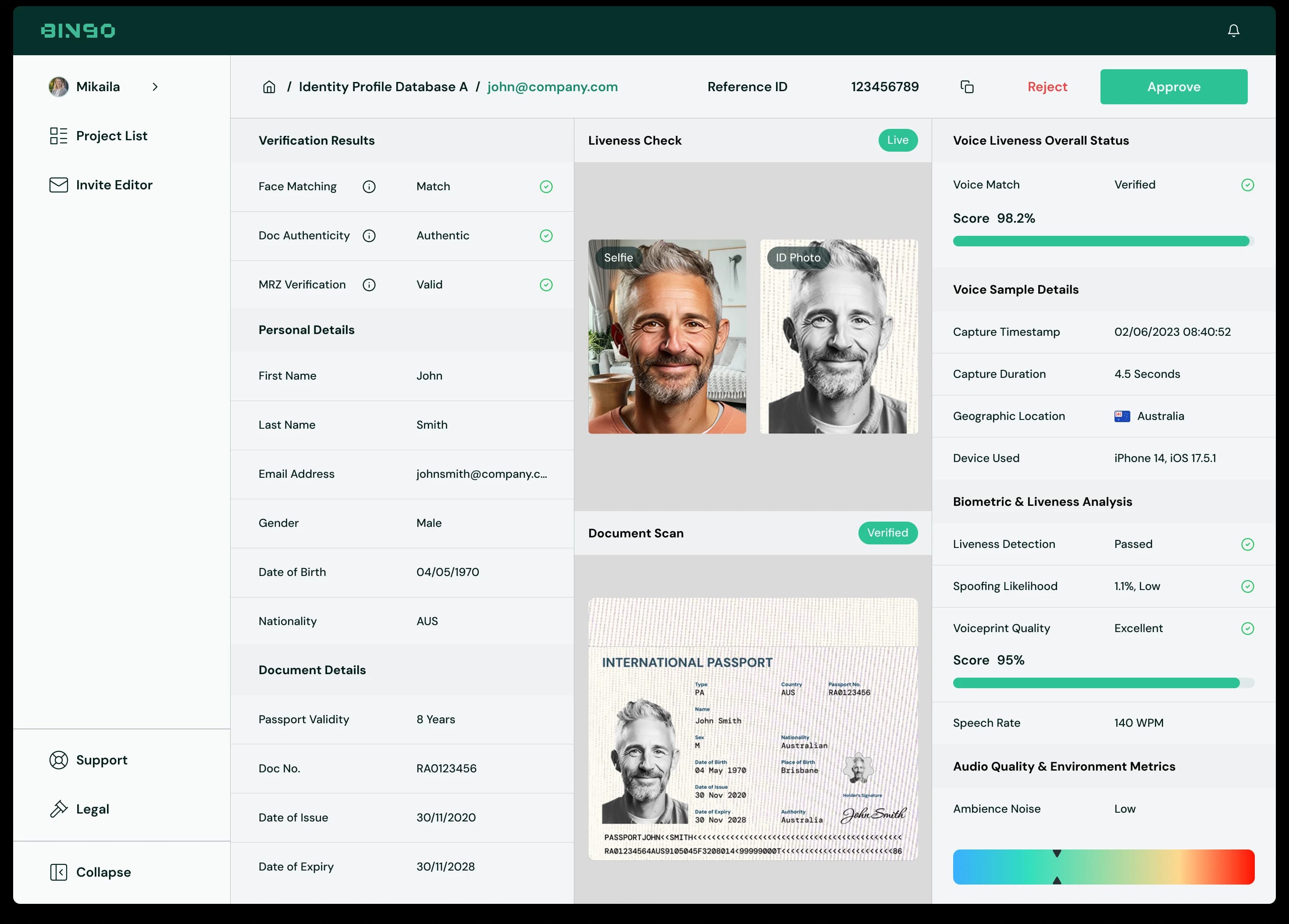
Submission detail, built to be scanned
v.02 laid the review out as six cards, each its own scale and its own scan, so an officer read in loops. The face and the passport sat side by side, but the data that would confirm them was three hundred pixels away.
v.03 fixes the order, not the styling: three panes hold fixed positions on every submission, so the page reads left to right in the order the decision is made.
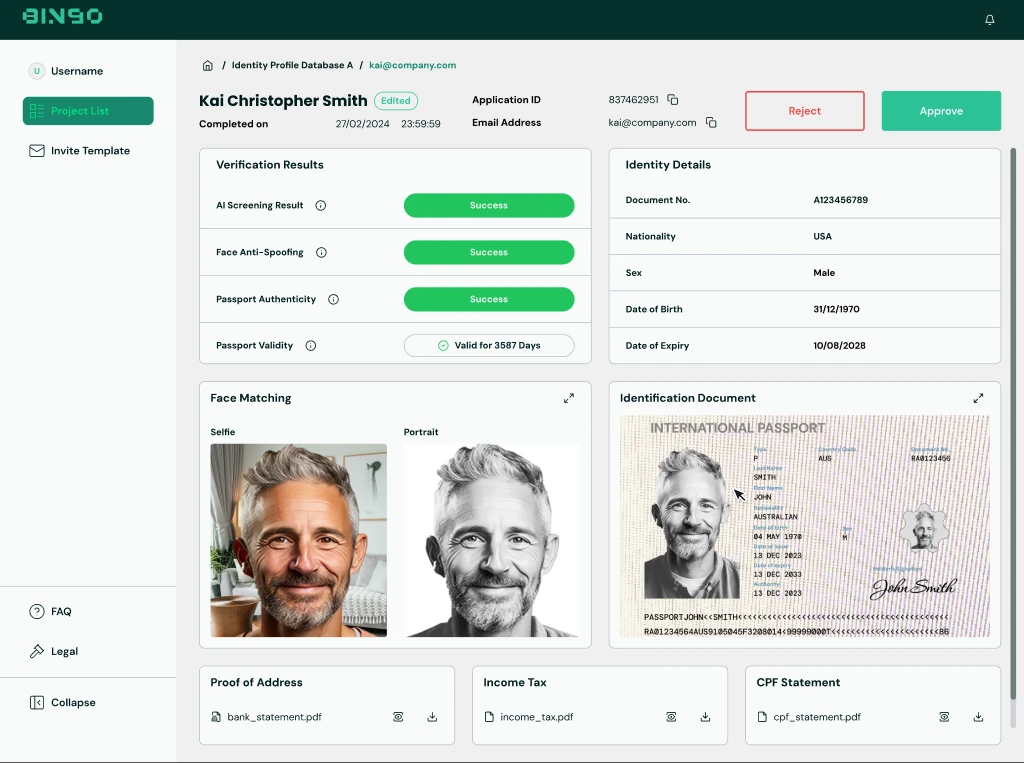
Six cards, six scans. The claim, the evidence and the identity data each sat in their own box at their own scale.
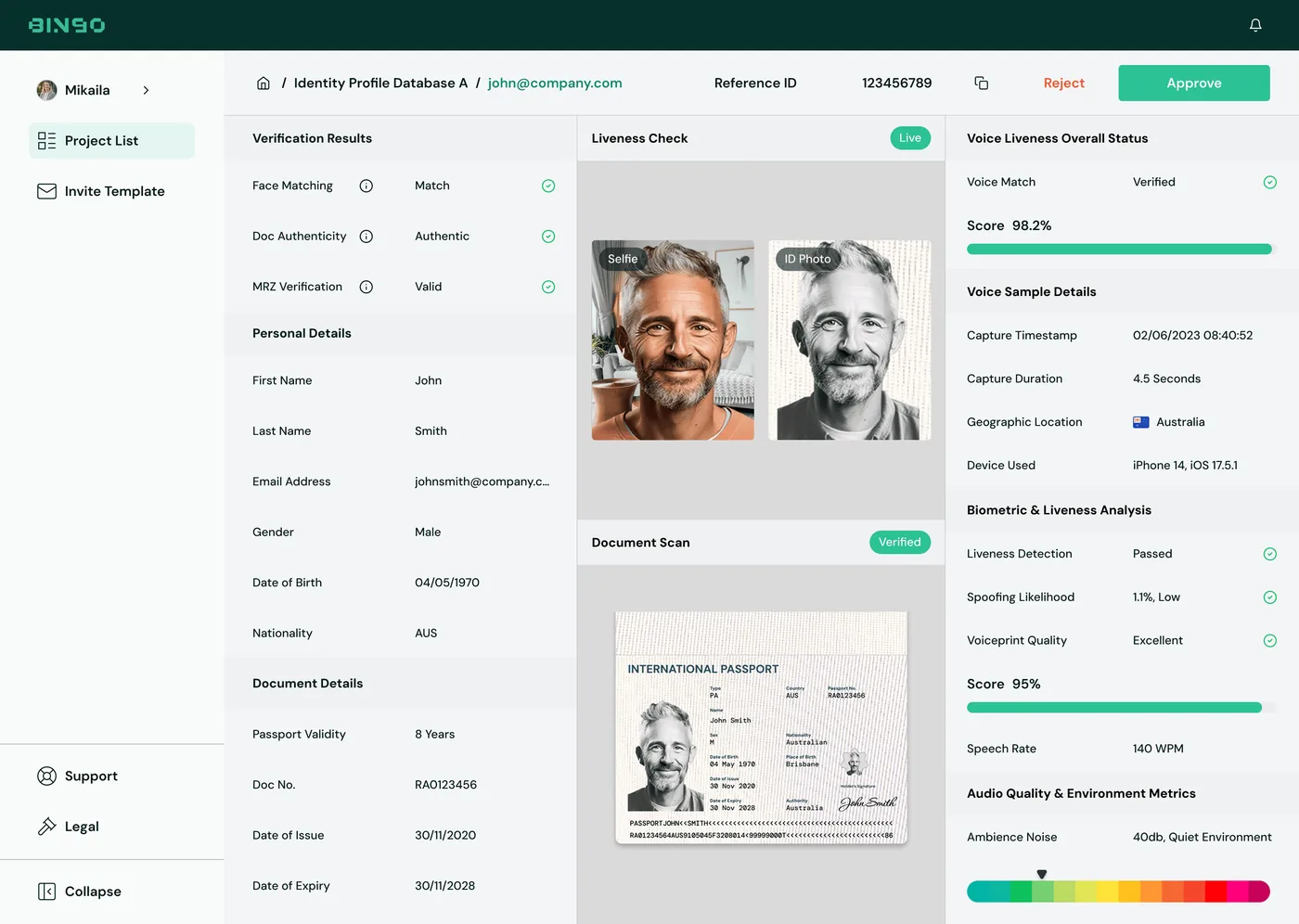
Claim, evidence, confidence, in three panes that hold the same position on every submission.
- Claim, evidence, confidence: the three questions an officer asks, in positions that never move.
- Details sit under the claim they support, so a mismatch is caught by reading down one column.
- Every score carries its reason codes, so 95% is checkable rather than something to trust.
Labels in the officers’ language
Every ambiguous column header was renamed to plain language, with tooltips for the remaining domain terms. The copy went through compliance review, so the explanations match how officers describe the fields to each other.
- Internal system codes were replaced with names from the officers’ own Card Sorting vocabulary.
- Tooltips surface detail on demand instead of crowding the table.
- The compliance team reviewed every line, keeping the language accurate as well as plain.
Human-readable data labels, with tooltips surfacing detail on demand.
Export where the work ends
Every review ends in an export, yet the action sat three levels deep in menus. It became a persistent button, so the last step of the task is also the easiest.
- One click from any state of the table, honouring the active filters.
- No navigation away from the review in progress.
- Exports as CSV or PDF.
Persistent one-click export, moved up from three levels deep.
Screen archive - every screen in the build, 18 for the deep read
Outcome
Where it landed
The rebuilt console shipped to production, and the retest ran the identical protocol as the first benchmark, so before and after are directly comparable.
Every search hands 3 minutes 3 seconds back to the officer running it. Across thousands of submissions a day, that is the difference between keeping up and falling behind, and it moved the console from a failing usability grade to an A.
What the work taught me
The console moved every number it was measured on, but the sharper lessons were about where the answers had been hiding all along.
Workarounds are a map
The officers’ personal spreadsheets were the real research finding. When people build their own tools around your product, they are drawing you a map of everything it fails to do, and the fastest wins came from reading it.
Language is design work
I expected Interaction Design to carry this project and I was wrong. Half the confusion came from labels named from inside the system rather than from the officers’ own vocabulary. Renaming things is unglamorous, and it moved SUS as much as any interaction change.
Measure with the same ruler
Running the identical benchmark protocol before and after is what made the result credible. A 50 point completion lift is easy to claim and hard to argue with when the method never changed.
Mentoring is a multiplier
Keziah and Anjelica joined as new designers and finished the project running their own reviews. Bringing them into real research sessions early, then handing them screens with clear guardrails, grew the team’s output faster than any process change, and it’s the part of this project I’m proudest of.